Join the beta

Clarity through the confusion of SAP

Stop memorizing SAP transaction codes.

For SAP S/4HANA and ECC support teams. Say what you need, or type a code and a number. Looking Glass finds the transaction, opens it with the number already in, and asks before anything can change your data.

Plain words or codes. Type it either way.

A code and a number. It opens with the number in.

Asks before changes. Runs locally, no account.

Why it exists

Clarity, through the confusion.

SAP is a maze of thousands of transactions, and nothing tells you which one is the right one or which one is safe. Looking Glass is the thread through it: it names the right screen, says why, jumps straight there with your number in, and asks before anything changes.

Built for SAP first.

How it works

Say it. Add a number. Open it.

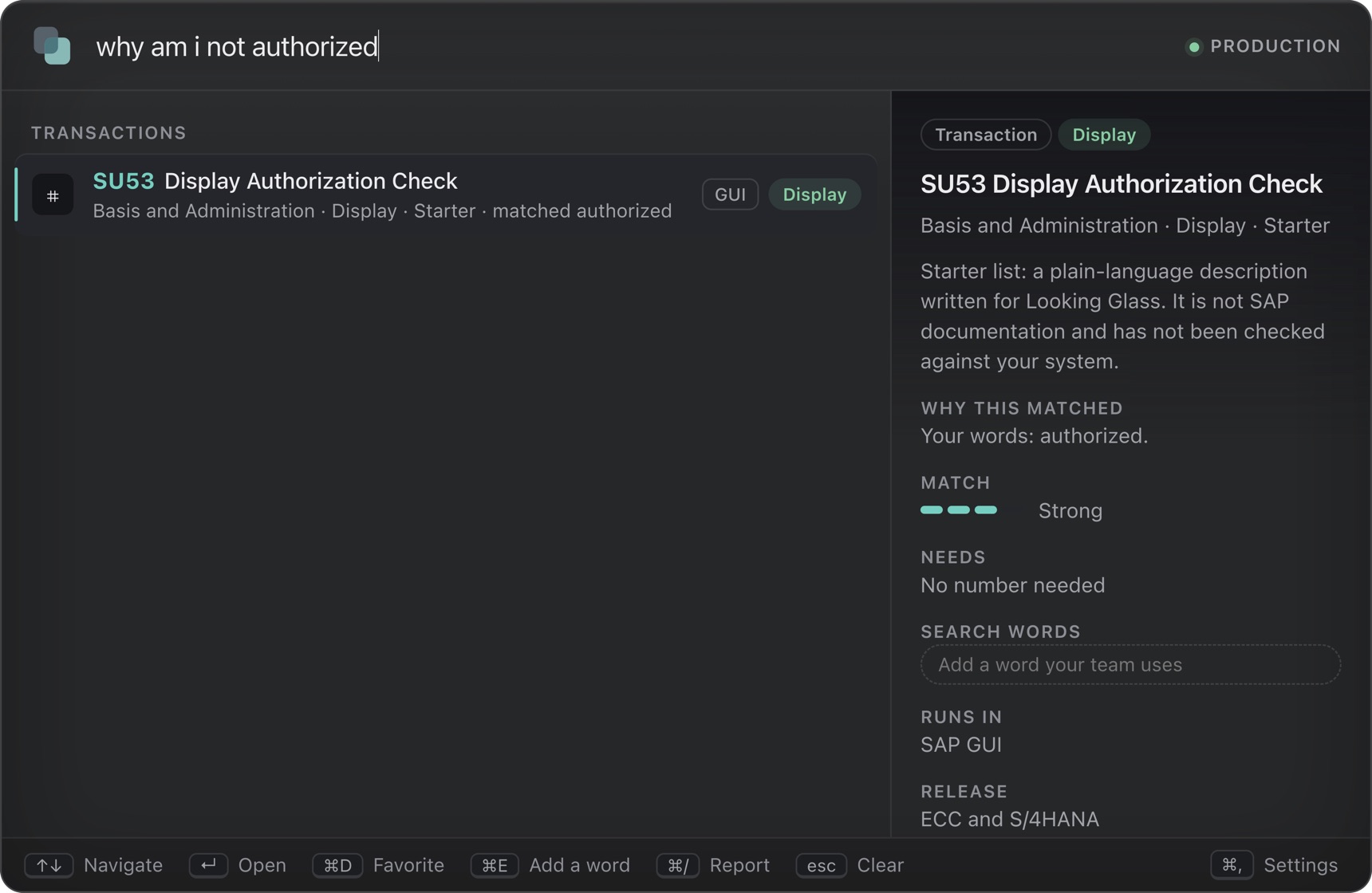
  1. The palette after typing: why am I not authorized. The Display Authorization Check transaction SU53 is the first result, with the words that matched shown beside it. Say it your way

    1 Say it

    Plain words, a question, SAP shorthand or a typo. Each result names the words that matched and how strong the match is.

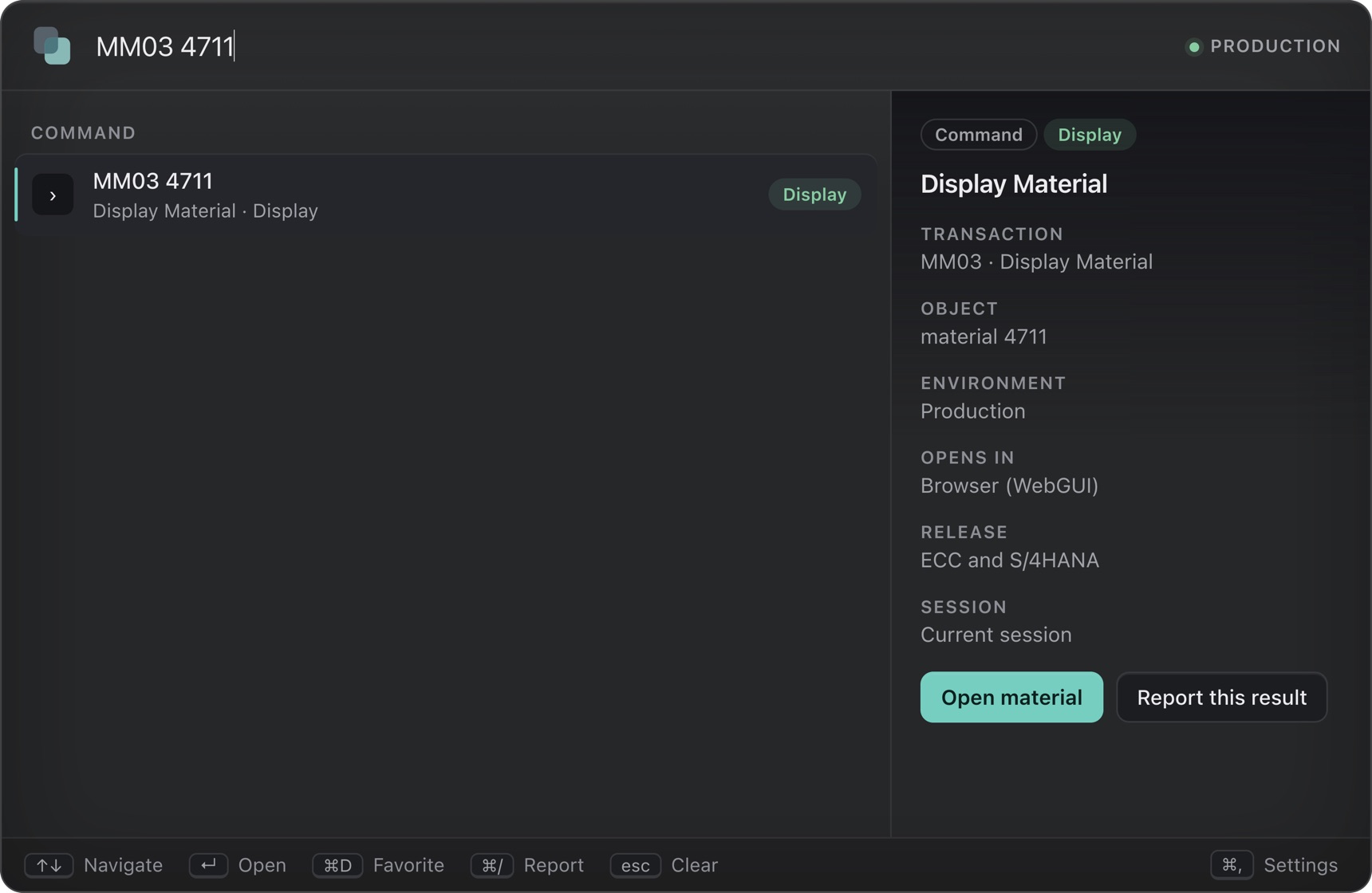
  2. The palette after typing MM03 4711. Display Material is shown with material 4711 and the note that it opens in the browser through WebGUI. The number goes in

    2 Add a number

    Type a code and a number, like MM03 4711. It opens with the number already in the first screen. No copying, no pasting.

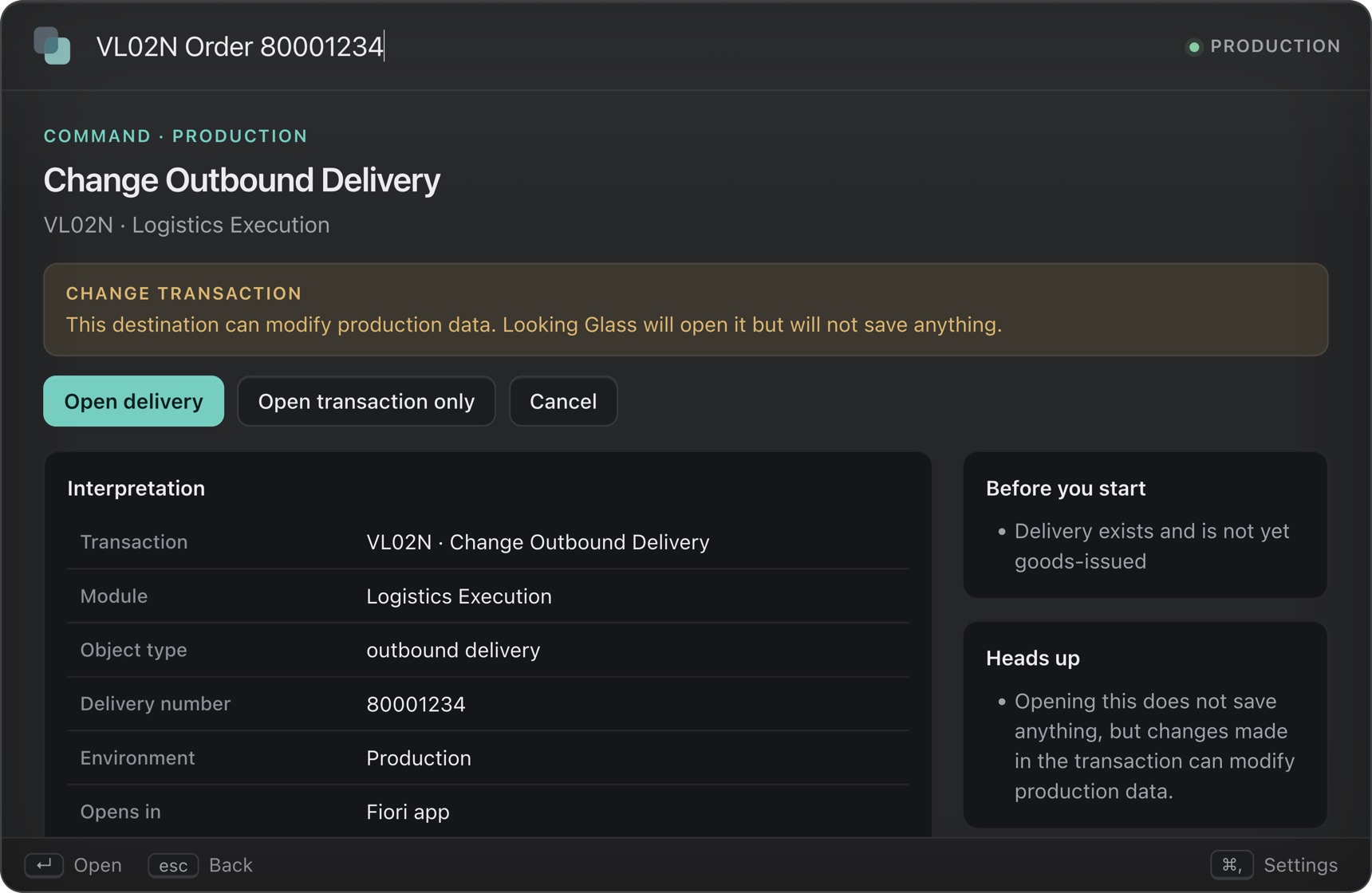
  3. The confirmation screen for Change Outbound Delivery, VL02N, with an amber banner reading Change transaction and buttons to open the delivery or cancel. Waits for you

    3 Open it

    Look-only transactions open straight away. Anything that can change data stops at a clear warning first.

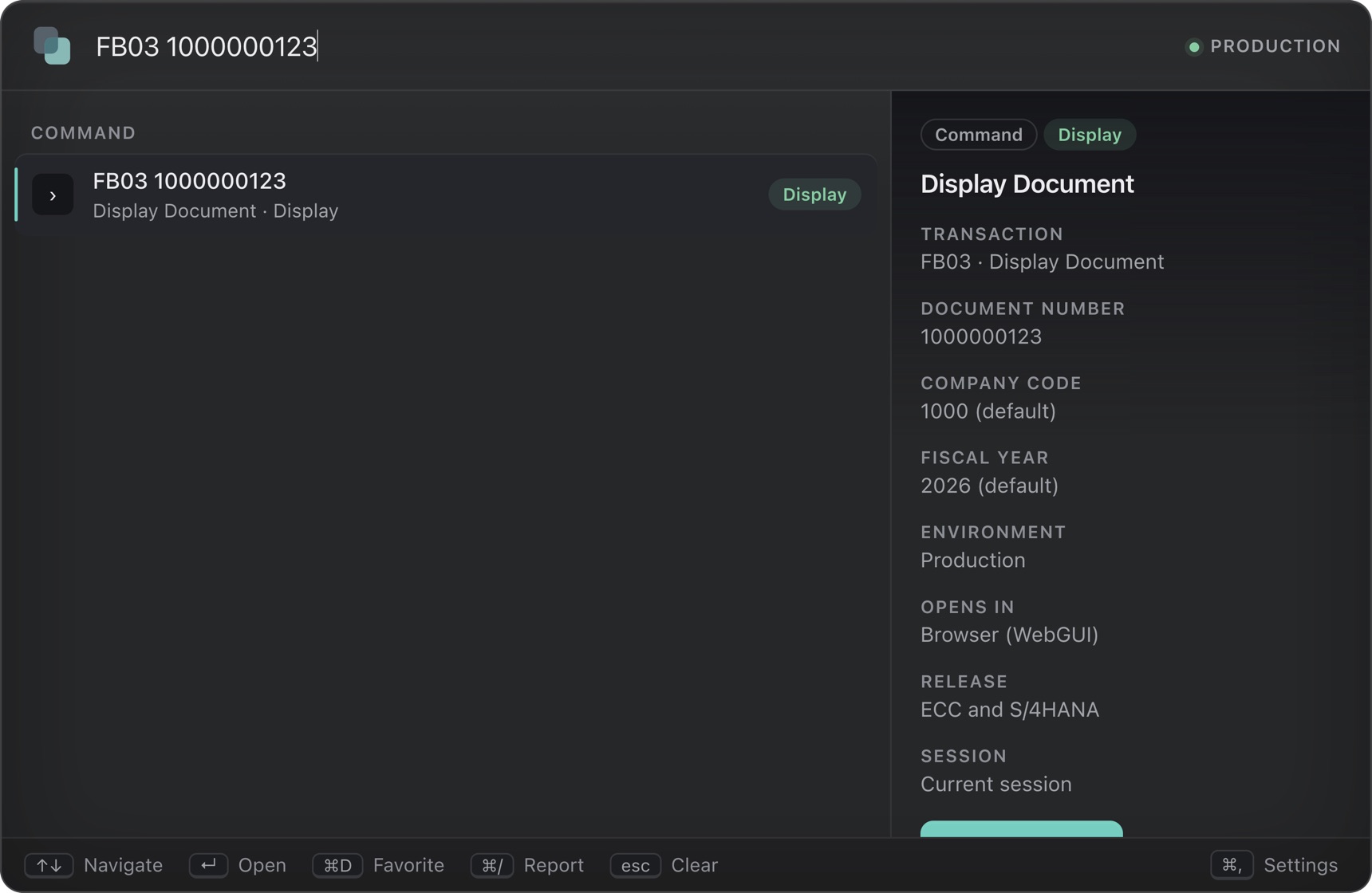
The palette after typing FB03 1000000123. The document number is shown, with the company code 1000 and fiscal year 2026 marked as defaults. Defaults are labelled

A code and a number

The number goes in. You do the looking.

Type FB03 1000000123 and the document opens. The company code and fiscal year are filled in from your defaults, and each one is shown as a default so nothing is a surprise.

  • It uses SAP's own skip-first-screen command, in the browser through WebGUI or in SAP GUI on Windows.
  • Built in for sales, delivery, billing, material, production order, user, table, accounting document and invoice screens.
  • Name a value to keep it in its place: FB03 1000000123 year 2025 fills the year and leaves the company code on its default.
  • Paste a number with no code, like 80001234, and it lists the screens it could open in, the one you used for that kind of number first.
  • Teach it any other transaction in a line: where its number goes, once.
  • It fills one screen and never presses Save. Change transactions still ask first.

Honest about it: it is tested against a stand-in for SAP. The first week of a pilot confirms the field names on your own system.

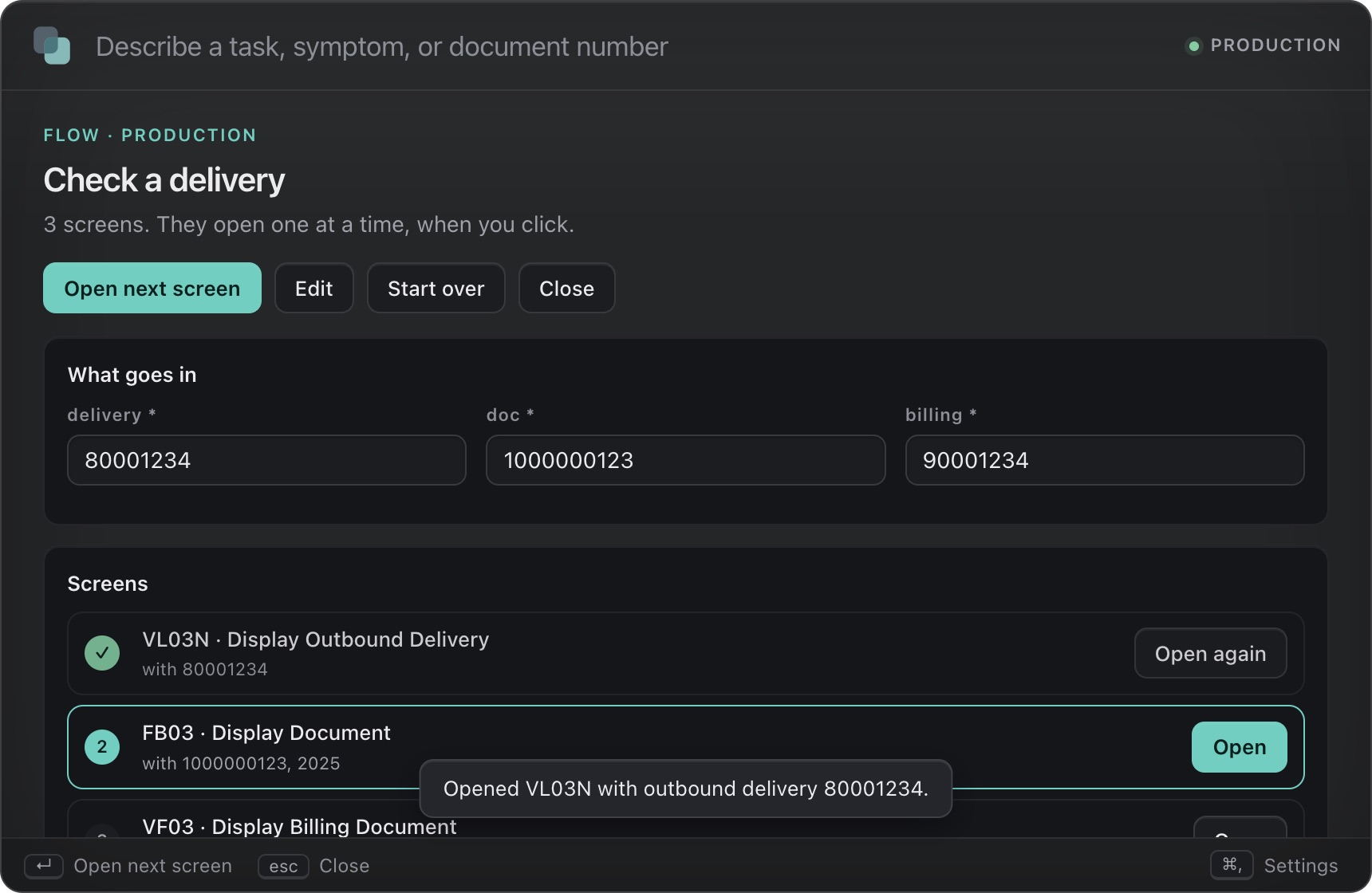
A flow called Check a delivery with three screens. The delivery, document and billing numbers are filled in once. The first screen, VL03N, is marked as opened, and the second, FB03, is next. Numbers are typed once

Favorites and flows

Keep the screens you always open.

Star a transaction and it waits for you on Home. Or save a flow: the screens you open together, like a delivery and then its invoice. Name it once, type the numbers once, and open each screen with a click.

  • A flow is a short list, like VL03N {delivery} then VF03 {billing}. Each number is asked once and goes into every screen that needs it.
  • Each screen opens when you click it, never on its own. A change screen still asks first, and the Production block still applies.
  • Home shows your last commands with their numbers, so one click runs FB03 1000000123 again. Save any command as a flow in one click.
  • Share flows and favorites with a colleague as a small file. It holds names and transaction codes only, and the person importing it keeps full control: anything their role or registry does not allow is skipped.
  • Flows, favorites and recent commands stay on your computer, and each can be switched off or erased.

Honest about it: a flow opens screens one after another. It does not click, save or post inside SAP.

Safe by design

Fast, but never reckless.

Looking Glass opens things. It never saves, posts or submits for you.

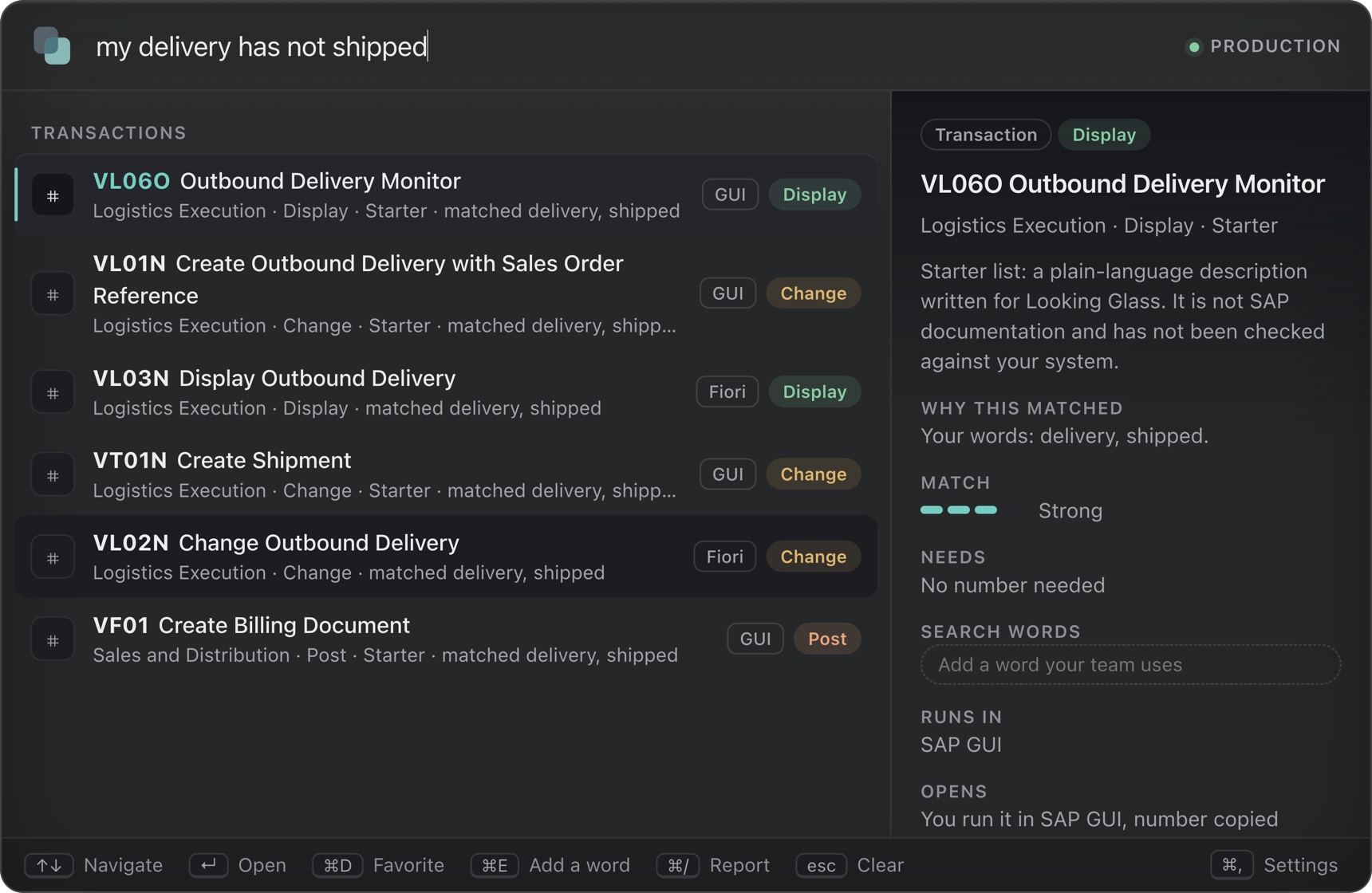
Results for: my delivery has not shipped. Each result shows whether it runs in Fiori or SAP GUI and whether it only displays, changes or posts. Display, change and post look different Why it matched
  • Can't be skippedChange and posting transactions always ask first.
  • The right systemList DEV, QAS and PRD. Nothing opens until you pick one, and it shows on every result. Optionally block change and posting in Production.
  • Honest messagesIf a number can't be filled in, it says so and copies it for you.
  • Role-awareDatabase and administration transactions stay hidden from people without those roles.

Make it yours

Your list, your systems, your words.

Your transaction list

Import the codes your company really has, 100,000 in about a second. Several languages are handled.

Your systems

DEV, QAS and PRD, each with its client, address and release. The system is shown on every result.

Your words

Add the phrases your team really uses to any transaction, and say where a number goes for the ones you use most.

Your feedback

Anyone can report a result as wrong or out of date. Whoever looks after the list reads and exports them.

142common transactions ready on day one, 14 that fill in a number
100,000codes import in about a second and search in under a tenth of one, in our tests
0accounts, and no cloud service to send your searches to
9 in 10plain-language requests have the right transaction in the top three, on requests we did not tune on

Who it's for

For the people between SAP and the business.

Help desk and support analysts

Find the right screen from what the user actually said, and hand off with the facts attached.

New and cross-trained staff

Get useful in SAP without learning the transaction list first.

Process owners and admins

See which searches find nothing and which results were reported, and teach it your words.

Operations leads

Run a small, measured pilot and see whether people get there faster.

The pilot

How the pilot works.

A 6 to 8 week trial with one team, designed to produce numbers you can show the people who sign off. It costs $2,500 and is credited against your first year if you continue.

  1. 1Week 1: Import your list

    You export your SAP transaction list and we load it. It is searchable the same day.

  2. 2Weeks 1 to 2: Set up your top transactions

    Together we pick the 10 to 20 transactions your team uses most, confirm where their numbers go on your system, and add the words your team uses.

  3. 3Weeks 3 to 6: One team uses it

    Up to 10 people use it for real work. We check in weekly and collect the searches that found nothing.

  4. 4Final week: Review the results

    We go through the measures together and you decide whether to continue.

What we need from you

  • An export of your SAP transaction list (the TCODE and TTEXT columns). Your SAP administrator may need to run it.
  • One team of up to 10 people, and one person who can confirm the transactions and field names on your system.
  • Your SAP launchpad address. SAP's WebGUI is on the same host, and it is what opens a transaction with the number filled in. Without it the number is copied for you to paste.
  • About an hour a week for a check-in.
  • Permission from your IT team to install the app. The Mac installer is signed and notarized by Apple, but your IT team still has to approve it.

What you get

  • Your transaction list imported, cleaned up and searchable.
  • 10 to 20 of your most-used transactions set up with their number fields and search words.
  • A weekly check-in and hands-on help during the pilot.
  • A written review of the results against the measures you agreed.
  • Your $2,500 credited toward the first year if you sign within 30 days of the review.

How we measure it

  • Time to the right transaction. A stopwatch on about 10 typical tasks, before and during the pilot.
  • Searches that found nothing. Collected by the app, so you can see the gaps.
  • Results people flag. Anyone can report a result that was wrong or out of date. We collect the exported reports at the check-ins.
  • A short survey at the end.
  • Setup effort. The hours it took us.
  • Repeat use. Observed in check-ins. The app does not count it yet.

What the pilot does not include

  • No live connection to SAP. It opens destinations you approve and does not read or write SAP data.
  • No custom development or new integrations. It fills the first screen of a transaction and never presses Save.
  • Filling in the number needs SAP WebGUI active on your system. Starting SAP GUI directly is optional, Windows only, and not yet run against a real SAP GUI.
  • The guided-process and knowledge-card features exist in the app but are switched off for the pilot, so it stays small.
  • Macs first. A Windows installer is built but untested, so a Windows pilot starts with a test on your hardware.
  • Support is the weekly check-in and email, not round the clock.
Request a pilot

See pricing below · contact@camdenburke.co.uk

Pricing

Simple, per team.

Start with a paid pilot. If it works, move to an annual plan. Billed annually in advance, by invoice, net 30. Prices exclude tax.

Paid pilot

$2,500one time

One team, 10 to 20 transactions

  • Import your SAP transaction list and set it up with you.
  • Set up the transactions that matter most, with their number fields.
  • Agree the measures up front and review the results together.
  • Credited against your first year.

Team

$4,800per year

Up to 25 seats, about $192 per seat

  • Everything in the product, with updates.
  • Your imported list, entry fields and search words.
  • Support by email.

Department

$14,400per year

Up to 100 seats, about $144 per seat

  • Everything in Team.
  • Priority support.
  • More than 100 seats: custom pricing.
Compare the pilot and the Team plan side by side
Paid pilotTeam plan
Price$2,500, once$4,800 a year
Length6 to 8 weeks12 months, renewing yearly
PeopleUp to 10 on one teamUp to 25 seats
Transactions set up10 to 20, with youAs many as you add
SetupIncludedSeparate: $1,500 to $5,000, or $150 an hour
SupportWeekly check-in and emailEmail
UpdatesDuring the pilotIncluded
The productThe same in both. The difference is scope, setup, support and how long it runs.
At the endDecide whether to continue. $2,500 credited if you sign within 30 days.Renews yearly unless you cancel.

First customers

The first few teams get a design-partner rate of about $120 per seat for two years, in exchange for honest feedback and, once there are results, a short case study.

Setup and curation

Want it done for you? $1,500 to $5,000 one time, or $150 an hour.

The payback

The Team plan pays for itself at about 1.2 minutes saved per person per day (25 people, $45 an hour, 220 days). Your pilot measures the real number.

Request a pilot

Prices are starting rates and may change as the product matures. Pilot customers keep the rate they agree.

Early beta

Be one of the first teams to try it.

Looking Glass is an early beta for Mac. I am looking for a few SAP support and business-systems teams to try it on a test system and tell me what is wrong with it. Join the list and I will email you once, with the installer and a 20-minute guide, when your place opens.

One email when your place opens, from Camden Burke. Nothing else, never shared or sold. Reply "stop" and your address is deleted. This site stores your email, the day you signed up and that you joined this list, nothing more. Privacy.

  • Free during the beta, on a test or quality SAP system.
  • It runs on your Mac and makes no network requests of its own. A one-page security summary comes with the invitation.
  • Mac first. A Windows version is planned and has not been tested yet.

Honest about it: it has been tested against a stand-in for SAP, not yet on your system. The beta's first job is to find out where that differs.

Want to talk first, or ask for a company pilot? Email me.

Questions

Straight answers.

The product

How does a code and a number work?

Type the code and the number, like VA03 123456 or MM03 4711. Looking Glass builds SAP's skip-first-screen command, *MM03 RMMG1-MATNR=4711, and opens it in the browser through WebGUI or in SAP GUI on Windows. Some transactions take several values: FB03 1000000123 fills the document, and your default company code and this year fill the other two. You can name them too, FB03 1000000123 2000 2025. The number is one clean value, so it can never add a second field or a command.

Which transactions can fill in a number, and can we add ours?

Built in: VA02, VA03, VL02N, VL03N, VF03, MM02, MM03, CO03, SU01, SE16N, FB02, FB03, FB08 and MIR4. For any other transaction, you add one line saying which screen field takes the number. SAP shows it under F1, Technical Information. That is how a 100,000-code company list gains number entry, one frequently used transaction at a time. The built-in field names come from SAP's standard first screens and are confirmed on your system in the first week of a pilot.

Does it connect to my SAP system?

Not to read or write data. It opens destinations your team has approved. For a transaction with a known number field it opens SAP WebGUI on your launchpad's host, or SAP GUI on Windows through SAP's own sapshcut tool, with the number already in the first screen. It never sends a password and never presses Save. Reading records through authorized interfaces is planned, not built.

Does it handle our DEV, QAS and production systems?

Yes. You list your systems once, each with its system ID, client and launchpad address. With two or more listed, nothing opens until you pick one, Production is never the default, and the system shows beside every result and on every confirmation. Switch by typing @. Each system uses its own launchpad address, and the Production block follows the system you chose.

Will it tell us what doesn't exist in S/4HANA?

Partly. Each system can state whether it runs ECC or S/4HANA. A transaction that carries a release tag is then marked when it doesn't fit, for example "Replaced: use BP", and ranked below the ones that do. It still appears, so someone typing an old code lands on the answer instead of a dead end. Every result also says whether it runs as a Fiori app or in SAP GUI. The tags it ships with cover only cases SAP documents, such as customer and vendor master moving to the Business Partner. SAP publishes no single complete list, so your own list and your process owner remain the source of truth.

Can we teach it our own words, and can people flag wrong results?

Yes to both. Anyone can add the words their team really uses to any transaction ("stuck shipment", "GRN status"), and those words then find it. They only widen the search and never change a transaction's risk label or what it asks before opening. Anyone can also report a result as wrong, out of date, or missing, with a short note. Reports are saved on that person's computer, and whoever looks after the list can read them in the administrator view and export them as a spreadsheet. A report never changes the results by itself.

Does it use AI?

Not today. Matching is a rules-based engine that runs offline, so every result can explain itself. An AI layer may be added later to improve ranking. If it is, it will only suggest. Your registry and launch rules would still decide what may run.

How accurate is the plain-language search?

On two sets of requests we wrote and never tuned on, the right transaction was in the top three results for about 92 to 94 in 100 requests, and first for about 75 to 77 in 100. We wrote the requests ourselves, so treat them as a guide, and your own list will tell you more. It misses when a request uses an idea nobody wrote down. Importing your list and the learning feature raise it for your team, and the admin view collects the searches that found nothing.

Where do the starter descriptions come from?

We wrote them for Looking Glass. They are not SAP documentation and are not checked against your system, and the product labels them that way. Your own imported list takes priority over them.

What isn't built yet?

It does not connect to SAP to read or write data. Its number entry, its switching between systems, its release marking, and its optional direct SAP GUI launch are tested against stand-ins, not yet a real SAP system or a real SAP GUI. A Windows installer is built but untested on a real Windows PC, so pilots start on Macs. Installers are not yet signed, so your IT team may need to allow them. Guided processes and knowledge cards exist in the app but are off for the pilot. Search words and reports stay on each person's computer, and sharing them across a team is by exporting and importing files, with no central console yet.

The pilot

How long is the pilot, and who can use it?

6 to 8 weeks, with up to 10 people on one team. The first week is setup, the next weeks are real use with a weekly check-in, and the last week is a review of the results.

What do you need from us to start?

An export of your SAP transaction list, one team of up to 10 people with someone who can confirm the transactions and field names, your SAP launchpad address so WebGUI can fill in numbers, about an hour a week, and your IT team's permission to install the app.

How do you measure whether the pilot worked?

We agree the measures with you first: how long about 10 typical tasks take before and during the pilot, the searches that found nothing, a short survey, and the setup effort. The app does not yet count repeat use, so that is observed in check-ins rather than reported as a number.

What happens after the pilot?

You decide. If you continue, your $2,500 is credited toward the first year of a Team or Department plan, as long as you sign within 30 days of the review. If you stop, nothing renews and you keep the written review.

Security and privacy

Does it send my searches anywhere?

No. Searching, learning and your saved progress all happen on your computer. There is no account and no cloud service in the product.

Commercial

How is it priced?

A paid pilot at $2,500 flat, then an annual plan per team: $4,800 a year for up to 25 seats, or $14,400 a year for up to 100. The first few customers get a design-partner rate. Everything is billed annually in advance by invoice, net 30, and prices exclude tax.

Can you invoice us and accept a purchase order?

Yes. Plans are sold by signed order form and invoice, so purchase orders and your usual payment process work.

Is this from SAP?

No. Looking Glass is an independent product made by Camden Burke. It is not affiliated with, endorsed by, or sponsored by SAP.

Spend less time hunting for the right screen.